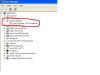
what does it mean?

winXP

New Member
I'm not sure where to post this.If i'm post not in the right section,please move it :)
Anyway,i give you a link of a picture below a screenshot that i'm curious about that i circled.What actually it does need and what should i do?

my.php


My computer is a desktop computer.It is an Acer Aspire SA20 with Pentium 4 2.8Ghz and 256MB Ram.
 
Last edited:
It means you have some issue with your graphics card, and you would probably want to reinstall or update your video drivers. Double-click on the flagged entry and see what the Device Status box says.
 
For those of you not able to connect to the link, this is what the image is (I had to scale it way down to get under the upload filesize limit):
 

Attachments

  • 2untitledoz3.jpg
    2untitledoz3.jpg
    13.6 KB · Views: 73
It depends, if you have (or use) an on-board (or integrated) graphics chip you would go to the website for the manufacturer of your motherboard and search for
a) Your model of motherboard
b) The graphics driver for it
c)Download load and install

If you have an actual graphics card (probably AGP or PCI-E) you would go to the website for the manufacturer of your graphics card and search for
a) The model of card you have
b) The most recent driver for it
c) Download and install

Hope this helps get you going...
 
I couldn't find at any websites but i only can show you this screenshot which look like it tells about the Display,i guess.How i will solve this problem?

untitled1.JPG
 
K,i have the Everest now.I have the screenshot but i'm not sure if this is the display card that i will search for,am i posting the right screenshot to show what is my diplay card?

untitled.JPG
 
Last edited:
He needs Drivers for that Integrated GPU.

I need sleep, If no one has found it for you by morning (for me)

I'll come back and find them
 
Back
Top