

You are using an out of date browser. It may not display this or other websites correctly.
You should upgrade or use an alternative browser.
You should upgrade or use an alternative browser.
What is this in my startup?
- Thread starter inderocker
- Start date

The_Other_One
VIP Member
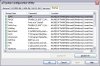
Square times female?  What's the location? Maybe that'd give some more info on what it actually is... Though you have some other rather odd looking things like Yl? ANd M3b?
What's the location? Maybe that'd give some more info on what it actually is... Though you have some other rather odd looking things like Yl? ANd M3b?
silverdark31
New Member
EDIT: wait, I've typed something you know...
Well, it could be some sort of Virus or something Malicious... Close all programs in the System Tray and see if it's still there. If it is, Uncheck it. If it does something bad to your computer, run safe mode and check it again. If it does nothing, leave it unchecked.
Well, it could be some sort of Virus or something Malicious... Close all programs in the System Tray and see if it's still there. If it is, Uncheck it. If it does something bad to your computer, run safe mode and check it again. If it does nothing, leave it unchecked.
Last edited:

gamerman4
Active Member
Downlaod this: http://www.mlin.net/files/StartupCPL.zip
it puts a Startup Manager in your Control Panel.
With this you can view more info about it.
1. Find the odd looking app. (There are tabs at the top if it isnt in that category.
2. Once found it should show you a full path to the .exe behind it. To copy and paste this path...
3. Right click and hit edit
4. Copy path and post the full path here.
From the name of the exe, its usually pretty easy to find out what it is.
it puts a Startup Manager in your Control Panel.
With this you can view more info about it.
1. Find the odd looking app. (There are tabs at the top if it isnt in that category.
2. Once found it should show you a full path to the .exe behind it. To copy and paste this path...
3. Right click and hit edit
4. Copy path and post the full path here.
From the name of the exe, its usually pretty easy to find out what it is.
inderocker
New Member
i took that one off the startup menu and restarted my computer... so i didn't come up. here are the others.


inderocker
New Member
cool, thanks.
i did a search for them and none of them came up.... wierd.
i did a search for them and none of them came up.... wierd.
All those random, cryptically named processes do not look good at all. However, even though they are still in the start-up list does not mean they will actually start if they have been deleted by an AV or by hand.
I'd give the machine a once over with Ad-Aware or something though. I notice you have SpySweeper in the list of processes so you've probably already done that though.
I'd give the machine a once over with Ad-Aware or something though. I notice you have SpySweeper in the list of processes so you've probably already done that though.
Last edited: