what is this light for?

anon125

New Member
model pavilion m9360f problem


just lately it makes a lot more noise than usual.

checked it for viruses.

it does not usually connect to the internet.

there are two lights on the front - one looks like discs and it is fine.

above that is a light that continually flashes. the sign next to it looks like "!".

what is this light saying?

thanks all
 
tthanks
so i looked at cpu activity.only about 3%
strangley the lisst of what was running kept changing!
that is a first!

the hard drive light is probably that activity.
 
The light that looks like this:
87956.jpg
is for hard drive activity.

The light that looks like this: "!" is the wireless network connection activity light. If it is not connected wirelessly, the light blinks steadily once every few seconds. If it is connected wirelessly, then it will blink more rapidly.
 
The light that looks like this:
87956.jpg
is for hard drive activity.

The light that looks like this: "!" is the wireless network connection activity light. If it is not connected wirelessly, the light blinks steadily once every few seconds. If it is connected wirelessly, then it will blink more rapidly.

AHA!!
thanks
well it is not supposed to be connected wirelessly!
and it blinks rapidly.
how do i stop it?
thanks
PS there is - as usual - a wireless modem in the same room.
we keep a little laptop in another room soley for internet and it wirelessly connects with the modem.
 
Last edited:
Unless you have it connected wirelessly then it isn't connected wirelessly.

What version of Windows are you running?
 
If you want to make sure it's not connected wirelessly, click on the network icon and open the Network and Sharing Center. In the left pane, click Change Adapter Settings. The adapter that is wireless should say not connected. You could even right click it and disable it if you want.
 
If you want to make sure it's not connected wirelessly, click on the network icon and open the Network and Sharing Center. In the left pane, click Change Adapter Settings. The adapter that is wireless should say not connected. You could even right click it and disable it if you want.

Thanks
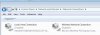
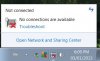
please see attached.
blue light is now steady.
computer still noisier than usual.
any ideas?
thanks
 

Attachments

  • Capture.JPG
    Capture.JPG
    35.6 KB · Views: 25
  • notconnected.jpg
    notconnected.jpg
    20.4 KB · Views: 27
The local area connection is the hard Ethernet line to the router/modem, so if you want to get on the internet, you need to enable that one.

As far as the noise, can you pinpoint where it's coming from? Only thing I can assume is it's a loud CPU or PSU fan.
 
Thanks
well there are 3 fans but they all seem to be running fine.
fans on power supply? Back of PC and the video card.
just have to hope it is not dying!
thanks
 
Back
Top