
Where has all my hard drive space gone?!

ttyler_00

New Member
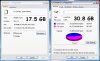
I recently checked my hard drive space the other day and saw I had consumed about half my hard drive. I didn't think I had that many programs so I highlighted everything in my C: drive and went to properties. It showed I was only using 17.5 GB, but when I check the properties from right clicking on the hard drive it says I've used 30.8 GB! I know the OS has some play in this but I thought the OS only uses about 3-5 GB, where is my 13 GB of space at? Thanks for anyone's support?

(I've posted a picture of the problem)
 

Attachments

  • harddrivespace.jpg
    harddrivespace.jpg
    95.1 KB · Views: 120
Sometimes if you delete many files, a similar program like this can occure. Have you tried running scandisk? Once I had about the exact same problem(about 18G of space used up with no trace) Apparently something happened in the FAT when I removed a video I'd captured and the space didn't show back up. Everything was cool after I ran scandisk
 
Do you use Norton Anti Virus ? If so check and see on your recycle bin if you have protected files and delete them. Norton can save a ton of useless files in the protected part of the recycle bin.

If you dont have that do a virus and malware scan, checkdisc, defrag the works.
 
Highlighting folders doesn't always count all the files inside, the folders inside, the files in the folders, etc.
 
like what has been said, empty the recycle bin, run disk cleanup, and defrag, after that you should cut out all the stuff you're not using
 
Windows Washer might be a good idea. The first time I used it, it cleared 1 gig of crap (2 gig did seem a lot for a win98se os), which is a lot for a 4 gig hard drive.
 
Back
Top