

Twist86
Active Member
So I been reading on overclocking a bit and I know now you gotta underclock your ram and what have you but the issue I have is I am suppose to have a HT that I should lower to x4 so I can OC my X2 4400+ to 2.6ghz stable.
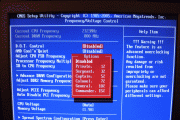
The issue I have is I don't have such a option. I borrowed my sisters crappy camera though to make sure I see what I need.
I think I found what I needed but I don't like the idea of possibly breaking my rig.
First shot my BIOS options

Second here is my
Processor Frequency Multiplier

DDR2 Ram

Also I was curious what the hell is this? Seems like a auto overclocker.
Here is CPU-z screenshots


The issue I have is I don't have such a option. I borrowed my sisters crappy camera though to make sure I see what I need.
I think I found what I needed but I don't like the idea of possibly breaking my rig.
First shot my BIOS options
Second here is my
Processor Frequency Multiplier
DDR2 Ram
Also I was curious what the hell is this? Seems like a auto overclocker.
Here is CPU-z screenshots
Last edited:

