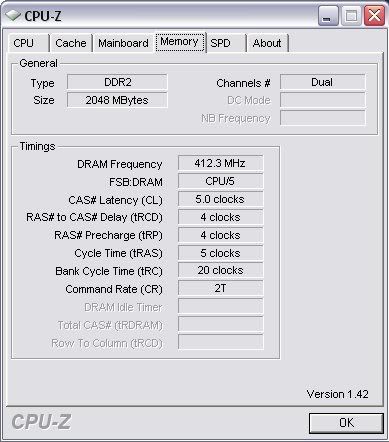
memory- tighter timings or faster speed?

WhiteFireDragon

New Member
would i benefit more if i had smaller timing numbers or higher mhz numbers? for OCing, the fsb the must match half of the memory speed for ddr2 if it's a 1:1 right? changing the divider will result in less stability so it's always best to have 1:1?
 
would i benefit more if i had smaller timing numbers or higher mhz numbers? for OCing, the fsb the must match half of the memory speed for ddr2 if it's a 1:1 right? changing the divider will result in less stability so it's always best to have 1:1?
You can use any ratio you want. If it's unstable, it's your OC not the FSB:memory speed ratio. Whether timings or frequency is better, it depends on the speed and timing differences you are looking at but I would probably tell you to go with more speed.
 
I can't say for sure, you should just do some tweaking and run some memory bandwidth tests to find out for sure what combination is best for you.
 
[-0MEGA-];960236 said:
I can't say for sure, you should just do some tweaking and run some memory bandwidth tests to find out for sure what combination is best for you.

and how would i know if timing or speed would be best for me? benchmarks?
 
Yes, I have done some tests as well and it seems as though significantly faster speeds are better, although you should try to have as tight timings as possible.
 
as far as benchamarks go, memory has almost no effect on any of the 3dmarks i've benched. i went from 2gb to 3gb with no increase in the score
 
That's just memory capacity. And you were already at 2GB. Try changing you're RAM speed from 400MHz DDR to 800MHz DDR or at least try to get 1 speed increment between speeds. Then compare the difference to that of changing timings from slow to fast.
 
Over-clocking generally always knocks down stability, even if it is only 3 to 5% it still knocks it down.
 
as far as benchamarks go, memory has almost no effect on any of the 3dmarks i've benched. i went from 2gb to 3gb with no increase in the score
As Cromewell said, thats just the capacity. Most likely you werent using the entire 2GB during the testing anyways, however I tested my system with different memory timings and I gained about 200 points in 3DMark06 by simply raising the memory speed and using tighter timings. (It's not much, but it is an improvement of some sort).

Over-clocking generally always knocks down stability, even if it is only 3 to 5% it still knocks it down.
I guess you could say that, although if you only perform a modest overclock and increase the voltage accordingly, there shouldn't be any issues. People have run stress tests for days on an overclocked PC without any errors.
 
That is why i said generally, if you mildly over clock you aren't gaining that much real world (if any) performance increase to begin with.

In some cases it can boost performance but in the end I would say that it is my opinion that its not really worth it, I'd rather have the stability.
 
i went from 2gb DDR2 533 CL4 to 2gb DDR2 800 CL6

The increase was very good, i benched using pc wizard, and my memory bandwith gained about 2000+ mb/s

My efficiency is not as good as the DDR2 533 because they have lower timings (so they find info faster, and better ) but the Speed increase did most the work...
 
The real latency didn't increase at all in your situation though. The CAS latency is 15ns for both DDR2-800 CL6 and DDR2-533 CL4. The relative timing is worse but the actual amount of time it takes is the same.
 
The real latency didn't increase at all in your situation though. The CAS latency is 15ns for both DDR2-800 CL6 and DDR2-533 CL4. The relative timing is worse but the actual amount of time it takes is the same.

Which is why all that mumbo jumbo is marketing tools for enthusiasts to spend more money than they need to and not really get any real world performance increase.
 
Which is why all that mumbo jumbo is marketing tools for enthusiasts to spend more money than they need to and not really get any real world performance increase.

so even though it might show up a few points higher in benchmarks, it wont really matter in real life applications?

doesn't higher memory speed at stock allow higher OC on the CPU since you don't have to OC the RAM to get to that high speed to match the CPU?
 
Last edited:
so even though it might show up a few points higher in benchmarks, it wont really matter in real life applications?

doesn't higher memory speed at stock allow higher OC on the CPU since you don't have to OC the RAM to get to that high speed to match the CPU?

Put it this way, and I used to be a systems builder by trade some years ago before I did network administration. If I took two of the exact identical machines with the exception that one had high speed RAM in it and one had generic RAM in it, you would never be able to tell the difference while gaming. Trust me, I built a generic gaming PC and put it on our sales floor, but the sales managers got mad because it wasn't promoting the higher dollar equipment.

Benchmarks do not really reflect real world application, because real world application does not run like a benchmark.

Does that make sense enough? I am trying to explain it very simply. Same thing goes with CPU. If I were to take a dual core and a quad core and sit them right in front of you to play like COD4 or whatever the hottest game is right now, you probably wouldn't be able to tell the difference.

The OS and the application have to support the multiple core, and be written and optimized to take advantage of higher speed hardware. You also sacrifice stability when you over clock. It is just like putting NOS on an engine, if you use it too much or crank it too hard you will throw a rod.
 
ok so i set my timings really low. the tRAS is unreasonably low, so how come my computer doesn't freeze up or crashes? how do i test for stability of this?

timings.jpg
 
The real latency didn't increase at all in your situation though. The CAS latency is 15ns for both DDR2-800 CL6 and DDR2-533 CL4. The relative timing is worse but the actual amount of time it takes is the same.

Which is why all that mumbo jumbo is marketing tools for enthusiasts to spend more money than they need to and not really get any real world performance increase.

Ignoring burst transfers and sequential operations and "easy" things of course :)


ok so i set my timings really low. the tRAS is unreasonably low, so how come my computer doesn't freeze up or crashes? how do i test for stability of this?
Memtest can do that, any major video encoding can easily break systems, as can 5Bn digit of pi calculations lol (or any Java/Quicktime application heh)
 
ok so i set my timings really low. the tRAS is unreasonably low, so how come my computer doesn't freeze up or crashes? how do i test for stability of this?

timings.jpg

You should have set the CL to 4, as thats where the biggest improvement comes from when lowering the timings. For stress testing, you can run memtest or the Orthos RAM test.
 
Back
Top