Computer build parts list (advice please)

The Janitor

New Member
Firstly ill say hello and introduce myself since this is my first post. Im John and im 22.

I have a parts list put together for my new build, and i have done my research but i just wanted some second opinions. Also this is not my first build. I actually ran a home based computer repair/ Custom build shop for a few years, but for the past 2-3 years ive been away from current technology due to money/family issues. Also for the past two years I have been stuck with an old Athlon XP machine running ubuntu which is better than nothing, but still sucks regardless (the pc not ubuntu, I love ubuntu).
Anyways on to the list. Im trying to keep it under $2700 so this is what i got together as the best "bang for my buck" build. Use will be gaming, occasional video editing/encoding, and coding (still learning..), as well as everyday use. Also mild to moderate overclocking. Any thoughts please let me know, im here for opinions.


Intel Core i7-2700K Sandy Bridge 3.5GHz (3.9GHz Turbo)

COOLER MASTER Hyper 212 Plus CPU cooler

ASRock Z68 EXTREME4 GEN3 LGA 1155 Intel Z68 HDMI SATA 6Gb/s USB 3.0 ATX Intel Motherboard

G.SKILL Ripjaws Z Series 16GB (4 x 4GB) 240-Pin DDR3 SDRAM DDR3 2133

X2 HIS IceQ X Turbo H695QNT2G2M Radeon HD 6950 2GB 256-bit GDDR5

CORSAIR Professional Series HX1050 1050W ATX

Crucial M4 CT128M4SSD2 2.5" 128GB SATA III MLC Internal Solid State Drive

X2 Seagate Barracuda ST31000524AS 1TB 7200 RPM SATA 6.0

ASUS DRW-24B1ST/BLK/B/AS Black SATA 24X DVD Burner - Bulk - OEM

LG Black Internal 12X Super Multi Blue with 3D Playback Blu-ray Disc Rewriter

X2 ASUS VW246H Glossy Black 24" 2ms(GTG) HDMI Widescreen LCD Monitor

Rosewill RDCR-11002 All-in-one USB 3.0 Card Reader

Rosewill BLACKHAWK Gaming ATX Mid Tower Case

Microsoft SIDEWINDER X4 Keyboard

Logitech G500 10 Buttons Dual-mode Laser gaming mouse

Arctic Silver 5 Thermal Compound - OEM


Subtotal: $2,695.80


Would ram with lower speed and better timing give me better performance? I dont think the timing is that bad for what i chose being 9-11-10-28.

Thanks,
John
 
Last edited:
List looks good but if your doing mild to moderate OC don't go below DDR1600, but the timing in what you have is good. For what you have a Cas Latency of 9 doesn't get much better.
Case
Liquid CPU Cooler
 
Overkill on the power supply. It wont hurt anything, but a good quality 750W will run two 6950 in crossfire fine.
 
Difference between the 2700k and 2600k is one multiplier, which you can change your self. Even then, a 2500k is more than enough for any games, and the video encoding will only see a slight increase with the 2600k/2700k. Something to think about.

The difference between 1600 and 2133 is minimal, as you probably couldn't tell the difference. I'm guessing this is the RAM you chose?

http://www.newegg.com/Product/Product.aspx?Item=N82E16820231503

Something like this would be all you need:
http://www.newegg.com/Product/Product.aspx?Item=N82E16820231315
 
PSU change

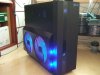
Well I thought it over and changed the PSU to a corsair professional series HX750. The 1050 was a bit overkill... Also i was looking through the cases again and found one i wanted about 6 years ago so i switched. I couldent believe it was still being sold, because i looked at it then when i was building my athlon x2 4200 system and it was a bit expensive then, now its cheap.. lol Its an XCLIO windtunnel. I just like the looks of it.

Thanks for yalls time and help, and it will still be a few days before i order everything so any more advice let me know.

Heres a quick pic of the case.
 

Attachments

  • XCLIO Windtunnel Fully Black.jpg
    XCLIO Windtunnel Fully Black.jpg
    23.3 KB · Views: 574
Let us know before you buy what you're gonna get.

And I dunno if I would trust the build quality on that case, especially since its so old. No new features like cable management, and it still has a top-mounted power supply slot.
 
If you're dropping about 100 on a case, then that's crap, look at the pics of the insides of these.

http://www.newegg.com/Product/Product.aspx?Item=N82E16811146068

http://www.newegg.com/Product/Product.aspx?Item=N82E16811146085

http://www.newegg.com/Product/Product.aspx?Item=N82E16811119194

http://www.newegg.com/Product/Product.aspx?Item=N82E16811119224

Notice the clots and the holes on the motherboard tray, they are to run the power cables threw to improve airflow and looks. And these cases i linked are all higher quality and, to me at least, better looking
 
I know...

I know but it just looks cool to me, did back then too, but i guess until i get my cube case mod done ill just get the one i picked first (list on first post). I will post before i buy.
Thanks,
John
 
The storm sniper is sweat, I got addicted and bought 4 of these. But don't forget the HAFX even though it costs $199. Its your money and I would suggest keeping the warranty info in a really safe place so you can get the manufacture to fix it for the next year. In my opinon the HAF 912 looks cool. That Case serves a purpose but not well.

I can more so see you keeping a PSU that is over kill. There are tons of reasons that its ok.
1 you want the 20% more power than you need to keep your system from frying.
2 you dont want to buy a new power supply next year when you decide you want to max out everything in a new system, judging from your history that's not going to happen. but it has a MTBF of 100,000 days. Thats over 10 years. The connections inside the PSU don't change a lot, but they have adapters if they did. I always plan to keep my case, HHD and PSU maybe the heat sink for the next build. Thats key to saving money with this habit. I can not fit a EVGA Classified SR-2 in my case, it would be nice to run duel 1366 CPU's and Quad SLI but I can fit everything else into it.
 
I can more so see you keeping a PSU that is over kill. There are tons of reasons that its ok.
1 you want the 20% more power than you need to keep your system from frying.
2 you dont want to buy a new power supply next year when you decide you want to max out everything in a new system, judging from your history that's not going to happen. but it has a MTBF of 100,000 days. Thats over 10 years. The connections inside the PSU don't change a lot, but they have adapters if they did. I always plan to keep my case, HHD and PSU maybe the heat sink for the next build. Thats key to saving money with this habit. I can not fit a EVGA Classified SR-2 in my case, it would be nice to run duel 1366 CPU's and Quad SLI but I can fit everything else into it.

The 750w corsair will have 20% extra power, even with two cards easily. And 750w is enough for the life of the computer.
 
Last edited:
I wish..

dont get me wrong, not being up to date killed me for the past few years. And the EVGA Classified SR-2 with dual xeons and quad sli would be awesome but realistically 1.Theres no way my budget would allow it and 2. i would never be able to utilize that kind of power. I used to be (and still am) a techy. always had top notch, always learning and keeping up to date. Between moving, family problems, life, having a family, etc... it just has not been possible. The only reason im able too now is because im getting stable and also im getting a decent tax return this year.

A few years back my uncle and i built a game room for his hobby, which is flight simulators. I built him a computer that was top notch at the time and i built all custom flight controls and panels, really neat, i had lots of fun learning and building that setup. but he had a really good budget as well, so resources were readily available. Now he calls me from fort worth (im in houston) and is asking me on a regular basis when im gonna build a new pc so i can fly with him.

I actually sacrificed alot on this build due to budget, so thats why i came here because i need some knowledge from people who are up to date on current technology because i want to build a pc that will last me for a while. I believe this will do it because I can hopefully upgrade as i need to (at least for a few years) and still be relatively up to date. Given I dont think ivy bridge will be a big step up from sandy bridge it will still be an option as long as asrock supplies bios upgrades to support them. also this board is PCIe 3.0 ready. I have also read though that with the cougar point PHC in current boards, native USB 3.0 and PCIe 3.0 will not be possible even with ivy bridge. panther point phc will be released with ivy bridge and it has native USB 3.0 and PCIe 3.0 support. now if thats true or not idk.
 
Xeons are more for servers. A regular desktop CPU would be better in games anyways.

Computer parts moves all so fast, it really is hard to keep up. I mean, I've only been a regular here for a few months and there has been so many changes, and I've learned a lot more here than anywhere else.

And I don't think the performance in games is worth the wait for Ivy.
 
Keep the PSU, but get a single 7950 instead of 2 6series cards. CF drivers a woeful.

Well I see the problem with micro-stuttering on SLI and CF setups but im seeing mixed opinions on if its really that noticeable or not. I have also read that there are sometimes driver problems with SLI/CF setups.

What i cant find is if a single GTX 580 or 7950/7970 would yield better performance than the 6950's in cf. If someone here could give me some advice and personal experience i would greatly appreciate it. The price is about the same give or take $20. I could always add a second gtx580/7970 later on down the road if ever i needed too.

Thanks,
John
 
2 6950's will be faster than a single 7970 or 7950, but a single 7970 will use much less power, it will have no driver issues, although those are generally resolved fairly quickly after a game launches. Also you can just buy one more card instead of selling the 2 and buying more
 
Crossfire driver support is much much less than nvidia simply due to company resources. CF 6950 will be slower in a lot of games than even a single gtx580 due to this reason. Even now, there are issues with Skyrim http://forums.ncix.com/forums/topic.php?id=2456333

Get a single 7950 (which overclocks to a 7970 quite easily), is slightly faster than a GTX 580 and avoids the driver issues.

I think the 7950 is the card of choice at the moment.
 
Last edited:
one more ?

This might be a stupid question but I was wondering if the two slots instead of one that are in-between the first and second PCIe slots labeled as #2 on this picture would mean a longer CF bridge would be necessary on this board? Its been a while since ive worked with dual cards and when i did it was with the first SLI cards.
Thanks
John
 
Crossfire driver support is much much less than nvidia simply due to company resources. CF 6950 will be slower in a lot of games than even a single gtx580 due to this reason. Even now, there are issues with Skyrim http://forums.ncix.com/forums/topic.php?id=2456333

I agree with you, I would get a 7950. For the performance/power is really a pretty good card. But now you got to be alittle more honest about the performance of two 6950 in CF. They will beat a GTX 580 in 95% of games and alot by a big margin.
 
Get a single 7950 (which overclocks to a 7970 quite easily)
Are you just talking about clocks? Because the 7950 has 1792 cores and the 7970 has 2048. With a core count advantage of 256, I would think you would need to OC the 7950 quite a bit above the 7970 to match it.

Or is my understanding way off?
 
Back
Top