HP Pavilion a1340n

hitmanwa

New Member
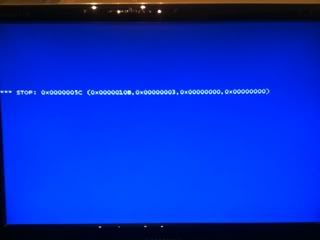
Having an issue with this particular desktop. When I let it go through it's normal boot cycle I get the BSOD.

Stop: 0x0000005c (0x0000010b, 0x00000003, 0x00000000, 0x00000000)

If I load "Last known good configuration" I get the same thing. But, if I select "Earlier Version of Windows" after hitting the F10 key during boot up it will load XP normally. I've tried restoring everything from the hidden partition but it does the same thing.

Any suggestions?

Thanks in advance,
 
Having an issue with this particular desktop. When I let it go through it's normal boot cycle I get the BSOD.

Stop: 0x0000005c (0x0000010b, 0x00000003, 0x00000000, 0x00000000)

If I load "Last known good configuration" I get the same thing. But, if I select "Earlier Version of Windows" after hitting the F10 key during boot up it will load XP normally. I've tried restoring everything from the hidden partition but it does the same thing.

Any suggestions?

Thanks in advance,

Is there an error message at the top of the screen?
 
No, it just has that stop error.

If wiping the HD and starting with a fresh install of XP is all I can do than that's ok. I just was wondering if there was anything else I could do before buying a new XP install.
 
Last edited:
Does it not say something where the first red box is?

Blue-screen-2.jpg
 
Thanks for the quick replies, I really appreciate it.

Doesn't say anything, just has the stop error. Gimmie a few and I'll boot it back up and get a screen shot.
 
Thanks for the quick replies, I really appreciate it.

Doesn't say anything, just has the stop error. Gimmie a few and I'll boot it back up and get a screen shot.

You won't be able to use the screen shot button. Do you mean with a camera? That would help.
 
Yeah, sorry, that's what I meant. They aren't very good with the Iphone. :)

Windows installation screen, if I remember right. It's not the normal XP splash screen.
photo2.jpg


But then it goes directly to the stop error.
photo-1.jpg
 
Hm. Well, I have done some reading, and it appears to be a variety of things. Have you tried booting with just one stick of RAM? If that doesn't work, try it with another. I doubt that is it, but it could be.

Can you get into windows at all?
 
If I select "Earlier version of Windows" it loads up just fine. That's what's puzzling to me. It won't load after a normal boot cycle and it won't load in safe mode but it will load an "Earlier version of Windows".

Maybe I'm thinking about this wrong. When it boots up there are 3 selections available.
Earlier Version of Windows
Windows Setup
Microsoft Windows Recovery Console

Earlier Version works.
Under Windows Setup I can go to select safe mode, Last Known Good Configuration, etc, none of these work. Is it stuck trying to finish a windows installation/recovery? How do you get it to default back to the earlier version that works?

I have swapped sticks of ram out, no change.
 
Last edited:
Yeah, that actually seems more like it is trying to finish an install. Do you have a disc you could pop in and see how that goes?

Or, when you go to Windows Setup, what happens? Are there more options? Or does it immediately BSOD?
 
No disk, it's got 1 of those hidden partitions on the HD. I have the home edition disks for my personal computer but this one, the one with the problem, has the media edition on it.

I've tried the whole recovery thing using the hidden partition but it does the same thing.

When I hit windows setup it blue screens right after the windows setup screen. Under F8 on the Windows Setup Screen you get the normal options, safe mode, sm with networking/command prompt, boot logging, low res video, last known config., directory services restore mode, debugging mode, disable automatic restart on system failure, disable driver signature enforcement and start windows normally.

Safe mode, last known config and start windows normally all blue screen.
 
You will need to boot into the recovery partition to redo the last install. You might have to do a destructive restore, which means you would want to backup any important data on the drive before proceding.
 
Thanks John,

I've tried a destructive recovery but it doesn't seem to work. I'll try booting into the hidden partition and if that doesn't work I'll try the destructive recovery again.

I might be missing something. When I boot into the other version of windows and can get into windows I can see the hidden partition but I can't seem to specify to boot into that partition from bios. Am I doing it wrong?

Thanks all,
 
Last edited:
Back
Top