
PCIE adapter?

All right let me get this straight. If I were to connect to my existing power supply, which does not have a 6 pin connector, would I have to use the included wire with the two 4 pin molex connectors? Would both the molex connectors need to be connected? Or is this wire only for newer motherboards?

By the way, I will switch the power supply these are just hypothetical questions that I hope will help me to understand.

Any more info will be great.

Thanks a lot
Nick

The P8 connector has nothing to do with your video card, its the 4/8 CPU power connector/ are not interchangeable. If your P/S does not have the 6 pin PCIe power connector you use the supplied 6 pin/molex adaptor with 2 4 pin molexs connected, then plug into your video card.
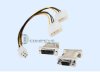
 
That's what I thought I just wasn't sure if both 4 pin connectors need to be connected.

So the connector isn't for newer models?

I'm very confused.
 
Last edited:
The P8 connector has nothing to do with your video card, its the 4/8 CPU power connector/ are not interchangeable. If your P/S does not have the 6 pin PCIe power connector you use the supplied 6 pin/molex adaptor with 2 4 pin molexs connected, then plug into your video card.

"Logisys 12V Molex to 8pin P8 Adapter for PCI-Express Video Cards" http://www.axiontech.com/prdt.php?item=78461

Now what were you saying about "P8" connectors? Note the term "P8" which doesn't slways refer to cpu power feeds.

nicnicman this further shows why the psu to PCI-E adapter cable was included since the older style supplies either lacked any dedicated 6pin plugs or the wrong size. The 350w replacement will likely see the same size difference as well for the 6pin plug there.
 
So I will have to use the included wire shown in the picture? If I have this right I will need to attach the connector to my power supply via two molex connectors and to my video card via the 6 pin connector on the other end of the included wire. This is because the power supply is lacking the necessary 6 pin connector.

I hope that the new power supply has enough molex connectors for this.

Thanks again
Nick
 
The 350w will see a 6pin identical to the one you see on the 305w in there now. The molex connectors on the adapter simply use the same type molex plug seen going into an ide drive hard drive or optical(cd, dvd) drive you have in now.

That also sees two 12v feeds rather then one dedicated 6pin allowing more amps to pulled from the supply if you oc the card itself. You wouldn't be doing that anyways there with either the 305w or 350w Dells sees in their replacement section. But you can see how that would work for those who do on newer models or custom builds seeing generally heftier supplies in use.
 
So I will have to use the included wire shown in the picture? If I have this right I will need to attach the connector to my power supply via two molex connectors and to my video card via the 6 pin connector on the other end of the included wire. This is because the power supply is lacking the necessary 6 pin connector.

I hope that the new power supply has enough molex connectors for this.

Thanks again
Nick

Yes
 
Now what were you saying about "P8" connectors? Note the term "P8" which doesn't slways refer to cpu power feeds.

I said (HIS) is not a PCIe connector. His is the CPU 4/8 power connector. He needs the PCIe 6 pin power connector. The PCIe and CPU power connectors are not interchangeable.
 
Well he won't see it on the 350w either while the specifications seen at Dell point out a dedicated 6pin for PCI-E there. No one said you use the cpu plug although if a newer supply sees a stand alone 4wire as well as that type of P8 connector and you are running an older model board you would simply add a P8 to to twin molex adapter inline with that and the drive to PCI-E adapter since that also sees two 12v outputs.

I wouldn't expect the 305w to have any dedicated 6pin since that came with the Radeon X300SE as an option plus being a low powered supply to start with just to meet Dell's specs there.

Eventually nicnicman you will have to buy a newer or build a newer system to allow for high end cards as you already know. Hope the 350w does work out while don't expect too much there either.
 
The twin 4pin molex connectors are for seeing the card powered by the P8 connectors required for some of the latest boards out while most still use the 4wire molex 12v cpu feed like you would have on the older P4 board there.

No one said you use the cpu plug although if a newer supply sees a stand alone 4wire as well as that type of P8 connector and you are running an older model board you would simply add a P8 to to twin molex adapter inline with that and the drive to PCI-E adapter since that also sees two 12v outputs.

Ok, for starters the first post above is nothing but a jumbled up mess of words, Make no sense at all.

1# The twin 4pin molex connectors are for seeing the card powered by the P8 connectors required for some of the latest boards

(The twin 4/8 pin are for the CPU not the card and they are not molex connectors.)

2#while most still use the 4wire molex 12v cpu feed like you would have on the older P4 board there.

(Then you say that.)

The second post above made about as much sense as the first one. All the guy needs is a 6 pin PCIe connector. Are you on Drugs?
 
Last edited:
Ok, for starters the first post above is nothing but a jumbled up mess of words, Make no sense at all.

1# The twin 4pin molex connectors are for seeing the card powered by the P8 connectors required for some of the latest boards

(The twin 4/8 pin are for the CPU not the card and they are not molex connectors.)

2#while most still use the 4wire molex 12v cpu feed like you would have on the older P4 board there.

(Then you say that.)

The second post above made about as much sense as the first one. All the guy needs is a 6 pin PCIe connector. Are you on Drugs?

No but I certainly wonder about you a good number of times. But since you don't seem to comprehend that are various types of molex connectors I'll have to fill you in here with a look at http://www.molex.com/molex/super_fa...erFamily&superFamOID=-8798&pageTitle=Overview
 
Yeah Yeah Yeah. Your like talking to a tree stump. I'm out of it.

Edit
Molex is a name of a company that makes connectors, (in the end the 4 pin connector used on drives was general known as a molex connector). So to say any connector is a molex connector is wrong. It fact no connector is a molex, that was the company name. So you calling any connector on the power supply a molex does nothing but confuse people.

The company started out making flower pots, out of a plastic called molex.
 
Last edited:
So it seems that getting the Quadro FX4500 to work on my Dell Dimension E510 is possible with the help of a flexible riser card and a new power supply.

My only question is will the new power supply http://accessories.us.dell.com/sna/products/Power/productdetail.aspx?c=us&l=en&s=dhs&cs=19&sku=A2125383#Overview have the necessary connectors?

My existing P/S has no extra 4 pin molex connectors or a 6 pin connector. I'm not sure what connectors are included in the P/S shown in the link. How can I tell?
 
Yes.

1 x 6 pin internal power

1 x power 24 pin ATX with detachable 4 pin section ¦ 3 x 4 pin internal power ¦ 1 x 4 pin mini-power connector ¦ 2 x 15 pin Serial ATA power ¦ 1 x power 4 pin ATX12V connector ¦ 1 x 6 pin internal power
 
You know iv left my computer case open slightly to fit full size cards in a half height slot. Not really 100% safe, but if your computer doesn't move its no big deal.
 
Thanks for the suggestion but I don't think that will work in my case. Its actually hitting on the processor/fan assembly.
 
Back
Top