
You are using an out of date browser. It may not display this or other websites correctly.
You should upgrade or use an alternative browser.
You should upgrade or use an alternative browser.
Recommended upgrades?
- Thread starter gunmetalTrevan
- Start date

gunmetalTrevan
New Member
That doesn't sound like too much of a problem- I wanted to get a bluray drive anyway. A friend of mine happens to have a very similar motherbaord, and he offered to borrow my hard drive, install Windows 7, and then bring it back to me so my computer will at least be operable until I get a new drive. He's very trusted, so you guys don't have to worry about that . Anyway, would this work? I believe this is the board he has - http://www.newegg.com/Product/Product.aspx?Item=N82E16813128495 . I don't know if that's what he has for sure, but he has an i7, and I'm almost sure it's the Z68 chipset-I'll have to ask him later today.
Also, I have never had a bluray drive in any of my computers before. Will it work just like any other DVD drives (installs games and such), or is it only for bluray movies? I'm not going to get this exact one, but I'm wondering if something like this will be fine. http://www.newegg.com/Product/Product.aspx?Item=N82E16827135247
EDIT: If you saw what I posted about RAID, don't worry about it. I started looking around the BIOS when I got home since that's about all I can do right now. BUT, I do have yet another concern- My power supply was making this extremely high pitched ticking sound. I don't think it was a bad capasitor though, because it wasn't a whining sound. It was random high-pitched ticking, like the sound of shooting sparks. I looked inside the power supply and saw nothing while it made these sounds. I turned it off for a bit, zip tied all my loose power chords, tucked them away, and now it doesn't make that sound anymore. What was that? A small short?
I'm still worried, however, because now it does make that high whining sound, but it's SUPER quiet-I can only hear it if my ear is ~5 inches away from the back of the power supply. Do I need to worry about this even though it's so quiet?
Thanks for the help again .
.
. Anyway, would this work? I believe this is the board he has - http://www.newegg.com/Product/Product.aspx?Item=N82E16813128495 . I don't know if that's what he has for sure, but he has an i7, and I'm almost sure it's the Z68 chipset-I'll have to ask him later today.Also, I have never had a bluray drive in any of my computers before. Will it work just like any other DVD drives (installs games and such), or is it only for bluray movies? I'm not going to get this exact one, but I'm wondering if something like this will be fine. http://www.newegg.com/Product/Product.aspx?Item=N82E16827135247
EDIT: If you saw what I posted about RAID, don't worry about it. I started looking around the BIOS when I got home since that's about all I can do right now. BUT, I do have yet another concern- My power supply was making this extremely high pitched ticking sound. I don't think it was a bad capasitor though, because it wasn't a whining sound. It was random high-pitched ticking, like the sound of shooting sparks. I looked inside the power supply and saw nothing while it made these sounds. I turned it off for a bit, zip tied all my loose power chords, tucked them away, and now it doesn't make that sound anymore. What was that? A small short?
I'm still worried, however, because now it does make that high whining sound, but it's SUPER quiet-I can only hear it if my ear is ~5 inches away from the back of the power supply. Do I need to worry about this even though it's so quiet?
Thanks for the help again
.
Last edited:

A bluray player will play dvd and cd's just fine. I wouldn't install windows from a different computer even though the motherboards are about the same, you may run into issues after booting up. Best to wait until you get a new dvd drive and install windows that way.
If the psu is still making that noise, I would rma it.
If the psu is still making that noise, I would rma it.
gunmetalTrevan
New Member
I am a little concerned about the power supply, but I have researched and found a lot of people with whining Antec power supplies. However, for me it is very quiet, and I practically have to put my ear up against a vent in the power supply to hear it at all- I almost think it's normal for the brand or something even though they have a pretty good reputation overall. Though the louder ticking sound did stop, but I don't know what that was all about.
Last edited:
gunmetalTrevan
New Member
Thanks for that advice. I'll keep an eye on the PSU especially while it's still on warranty. I'll report the power status of it soon, too. I also decided to try out the "friend borrow hdd, installs Windows" thing since I don't think I really have anything to lose, and it turns out he has the same board as me, his is just the micro ATX model. If this doesn't work, could anythign be permanently damaged? I can't think of anything, but I'm better safe than sorry.
Edit: I just remembered that when I was putting in the new CPU and heatsink, I noticed some grey matter on the heatsink that looked and felt like thermal paste. When I noticed it, I had already put a dab of my own paste (about the size of a pea) on the CPU. Was I supposed to put my own paste on it anyway? I know I might sound a bit paranoid and "questiony," but it was $527, and I don't want any overheating or damage, and like I said, better safe than sorry.
.Edit: I just remembered that when I was putting in the new CPU and heatsink, I noticed some grey matter on the heatsink that looked and felt like thermal paste. When I noticed it, I had already put a dab of my own paste (about the size of a pea) on the CPU. Was I supposed to put my own paste on it anyway? I know I might sound a bit paranoid and "questiony," but it was $527, and I don't want any overheating or damage, and like I said, better safe than sorry.
Last edited:
gunmetalTrevan
New Member
Well, guys... the Windows thing didn't work, but my friend did bring his DVD drive over and I got it installed. I'm happy to say it was a success! The computer is significantly faster in general and in certain games. I didn't get to play on it much, but in Crysis, I saw a some 10-15 fps increase and my ram wasn't even dual channel. Thanks for the suggestions of great parts.
.
gunmetalTrevan
New Member
I hate to bother again since I thought this was over with, but my thoughts on my PSU have gone to another level since I think it MIGHT be failing, but I am unsure since I don't have any problems powering it on and off, and games are working okay. Look at this-
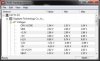
The 12v is only at 8 volts, and the 5v is only above 4 volts. The max levels were under load for roughly 20 - 30 minutes on Mirror's Edge and Crysis.
If you're wondering why it says "FATTY-PC", that is merely an inside joke
However, in the BIOS I am getting this-
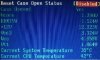
The 12v is only at 8 volts, and the 5v is only above 4 volts. The max levels were under load for roughly 20 - 30 minutes on Mirror's Edge and Crysis.
If you're wondering why it says "FATTY-PC", that is merely an inside joke
However, in the BIOS I am getting this-
Last edited:
You might want to invest in a power supply tester to check voltages. Something like this.
http://www.newegg.com/Product/Product.aspx?Item=N82E16899705003
However, You may have a bad motherboard. I just had a clients system that got hit by a power outage/surge to where it wouldn't boot into windows. It's got 2 slight blown caps and the bios detects the correct voltages. However what is weird is that that the software I used at first detected the correct voltages but changed within a few seconds. Went back into the bios to check them and they changed as well. Got my tester out and voltages were fine. plugged in my spare corsair 430 watt unit and it did the same thing. So basically its a bad motherboard and they had me build them a new system.
http://www.newegg.com/Product/Product.aspx?Item=N82E16899705003
However, You may have a bad motherboard. I just had a clients system that got hit by a power outage/surge to where it wouldn't boot into windows. It's got 2 slight blown caps and the bios detects the correct voltages. However what is weird is that that the software I used at first detected the correct voltages but changed within a few seconds. Went back into the bios to check them and they changed as well. Got my tester out and voltages were fine. plugged in my spare corsair 430 watt unit and it did the same thing. So basically its a bad motherboard and they had me build them a new system.
gunmetalTrevan
New Member
From what I've heard, Gigabyte makes some of the better boards that are out there, but many of the ones I look up have reviewers stating issues with the board. Mine in particular has quite a few 1-star/1-egg ratings (I believe 21%), and I was fairly nervous about having it. Instead of getting a power supply tester, what if I just plugged in a couple different power supplies and recorded the voltages through HWMonitor and the BIOS? I have the 600w I was using before, and a 350w somewhere- I am aware that I should not have my GPU plugged in if I test out the 350w.
So let's say I try all three power supplies and they all come up normal in the BIOS, but not in HWMonitor. What would that mean?
So let's say I try all three power supplies and they all come up normal in the BIOS, but not in HWMonitor. What would that mean?
gunmetalTrevan
New Member
Does HWMonitor use a different sensor than the BIOS? If it is just the sensor, will I ever be able to replace it or is that just going to be one of the cons of my board?
EDIT: My computer also does not make any sort of beeps when it turns on, though I'm no sure if that means anything.
Also I did some reading on HWMonitor and other monitors and found a lot of people with this problem, but their PSU's are fine. Right now it says my 12v is running at 4v, and the lowest it got to was 0.77v. It gradually goes up when the system turns on, but after around 20 minutes, it gets stuck at ~8v and stays around there.
EDIT: My computer also does not make any sort of beeps when it turns on, though I'm no sure if that means anything.
Also I did some reading on HWMonitor and other monitors and found a lot of people with this problem, but their PSU's are fine. Right now it says my 12v is running at 4v, and the lowest it got to was 0.77v. It gradually goes up when the system turns on, but after around 20 minutes, it gets stuck at ~8v and stays around there.
Last edited:
gunmetalTrevan
New Member
Okay, I think it's safe to say everything is okay at this point. I talked to a computer guy, and everything has say a 95% chance of being perfectly fine. The PSU does have a slight coil whine, and I don't have a motherboard speaker plugged in (I saw one in my home somewhere recently). My main concern when I called him was when my computer started making a buzzing/Morse code noise (very similar to the sound some graphics cards make when in certain game menus and such) when not under load. He told me to download "prime 95" and run it for about a half hour and that if it worked after that, it should be fine, and it was. The sound was pretty quiet, and it stopped that same day randomly, but It'll probably come back occasionally - it might have just been coming from some update running in the background or something. I may purchase an extended warranty on the PSU just in case since it's only $10, you never know. I read that most of these sounds are nothing dangerous or to worry about, they are just an annoying side effect if it's loud, and mine aren't even audible unless I have my head down by the computer.
That being said, I'll just finish off saying thanks again for the awesome part suggestions and amazing speed boost!
That being said, I'll just finish off saying thanks again for the awesome part suggestions and amazing speed boost!
Last edited: