Simple advice on HPE480t series

lewiedude

New Member
Should I go with the 80gb SSD (compatible with the 8GB of SDRAM) for the primary drive to store and launch my proggies and utilize a 1TB secondary drive? I am using photoshop and other photo video processing software. Also, there are a few recommended video cards and I can't decide which to get. This is the configuration that I chose, so far:

# Genuine Windows 7 Home Premium 64-bit
# Intel(R) Core(TM) i7-960 quad-core [3.2GHz, 1MB L2 + 8MB shared L3 cache]
# 8GB DDR3-1066MHz SDRAM [4 DIMMs]
# 80GB solid state drive
# 1TB 7200 rpm SATA 3Gb/s hard drive
# No additional office software
# Norton Internet Security(TM) 2011 - 15 month
# 1GB ATI Radeon HD 5770 [dual-link DVI, HDMI, DP, VGA adapter]

Any thoughts are helpful and most appreciated. I am also going to utilize a dual monitor set up...24" each!

Thanks again for the help...Lewiedude.
 
I'd recommend the SSD. I wouldn't recommend the i7-960 if it's costing you more than $100 more than a similar system with a 950. The chip alone is nearly twice the cost of the 950, and at 0.14 Ghz faster, not worth the cost.

There's something wrong with the amount of RAM. The i7-960 is a socket 1366 chip which utilizes triple channel memory - 3 or 6 DIMMs - for 6 or 12 GB RAM.

The video card choice is dependent on your intended use. If you're not a gamer or a light gamer then the 5770 will be OK - If you'll be running some of the newer games then I'd recommend a minimum of a GTX 460 1 GB or an HD 6850. A premium CPU such as the 960 really should be paired with a GTX 470/480 or an HD 6870/6970.

You might consider assembling your own system as most of us have. Compared to a preassembled system, and generally for about the same cost, you could build a rig with a much nicer case, a better power supply that would accommodate future upgrades, a motherboard that would allow you to overclock, much faster RAM, (1066=slow), and a graphics card that is better suited to your needs. And the best part - You'll have the knowledge to upgrade single components as needed rather than buying a complete new system every X number of years. Just a thought. :)
 
Thanks for the advice! I would love, love, love to build my own PC, but have absolutely no time. If there is a company that I can custom order from that won't cost an arm and a leg, I am all ears! As for HP, I have had tremendous luck with my laptop purchased in '05 and hope to continue the streak with the PC. I also checked out Dell and they don't offer a SSD drive in my price range. A couple more q's if you don't mind...
- did you mean to say HD5870 & HD5970 for the video card? Those are the choices that are there.
- if I am going to dual monitors should I have a dual dvi card?

Thanks for the insight, trust me when I say how valuable it is and I hope to be a contributer soon! Just give be a couple of focused days trying to set up my new computer station! Lewiedude.
 
Last edited:
A couple more q's if you don't mind...
- did you mean to say HD5870 & HD5970 for the video card? Those are the choices that are there.
- if I am going to dual monitors should I have a dual dvi card?

No, I didn't mean 5870 & 5970. The 6850 & 6870 has been available for a while, (6970 soon). That's the difference in buying prebuilt machines. They're selling older stock and technology while enthusiasts are buying the latest, (read better/faster), components. Like the memory - they're selling 1066 MHz while 1600 is the current standard - Many enthusiasts are buying 1866 and 2000 MHz memory. The cases and PSUs are almost always crap - Plus they load a bunch of their proprietary software that you don't really want.

Anyway, sorry for the rant, I feel better now. Truly - Almost anyone could assemble a system in a few hours - Really not hard. What takes the time is determining a balanced and compatible mix of components, but that's where we come in.

And, to answer your second question, for dual monitors you'll want Dual-Link DVI Support such as the 5xxx and 6xxx series cards have.
 
What was the cost for your build? Is there a way that you could help me figure out the necessary component list to build a pc that would be state of the art components that were spec'd out in the original post? I am looking to spend $1,500 on the PC and another $500 on the monitors(not needing super high-end ones at the moment - more interested in large real estate i.e. 23" or 24" panels). Also, your build is super clean wiring wise and other on the inside. Remember, I want to stay with SSD for the main hard drive(if it is called that when it is SSD) and look for 1 or 1.5 TB for the secondary drive.

Cool and thanks for the advice.
 
I've got probably over $2000 in the basic system, (not sure I want to add it all up), but I've bought some expensive components that I certainly could have gotten similar performance for less cost. Example - $330 case, $250 RAM, $180 PSU.

I be happy to spec you a build, as other here might also. I've got a function tonight, but I'll post something up later tonight or early tomorrow. :)
 
It would really be appreciated. I am interested in the Intel i7 series chip, up to 12gb RAM, a video card with the dual DVI for the two panels, blue ray DVD, firewire card(more reliable for me although I don't know anything about usb3), integrated bluetooth...you get the drift. Thanks again and don't bust a hump getting me the spec sheet. Take your time.
 
OK, Here's a starting point at ~ $1,400. Look it over and tell me what you like or don't like, questions, etc. and we'll go from there.

Few questions, How much gaming?, What games?, What other uses and applications? Any particular reason for 12 GB of RAM, (4 to 6 GB is sufficient for 98% of us).

i7-950, $295
http://www.newegg.com/Product/Product.aspx?Item=N82E16819115211&cm_re=950-_-19-115-211-_-Product

GIGABYTE GA-X58A-UD3R LGA 1366, $210
http://www.newegg.com/Product/Product.aspx?Item=N82E16813128423

CORSAIR XMS3 6GB (3 x 2GB) DDR3 1600 Desktop Memory, $130
http://www.newegg.com/Product/Product.aspx?Item=N82E16820145236

SeaSonic S12II 620 Bronze 620W Power Supply, $75
http://www.newegg.com/Product/Product.aspx?Item=N82E16817151096

SAPPHIRE 100315L Radeon HD 6850 1GB 256-bit Video Card, $200
http://www.newegg.com/Product/Product.aspx?Item=N82E16814102908
OR
EVGA GTX 460 Superclocked 1GB Video Card, $210
http://www.newegg.com/Product/Product.aspx?Item=N82E16814130571

OCZ Vertex 2 90GB MLC Internal Solid State Drive, $185
http://www.newegg.com/Product/Product.aspx?Item=N82E16820227601

SAMSUNG Spinpoint F3 HD103SJ 1TB Internal Hard Drive -Bare Drive, $70
http://www.newegg.com/Product/Product.aspx?Item=N82E16822152185

ASUS Black Internal Blu-ray Drive - OEM, $40
http://www.newegg.com/Product/Product.aspx?Item=N82E16827135205

COOLER MASTER Storm Scout ATX Mid Tower Computer Case, $80
http://www.newegg.com/Product/Produ...9196&cm_re=storm_scout-_-11-119-196-_-Product
OR
Antec Nine Hundred Black Steel ATX Mid Tower Computer Case, $100
http://www.newegg.com/Product/Produ...129021&cm_re=antec_900-_-11-129-021-_-Product

Microsoft Windows 7 Home Premium 64-bit 1-Pack for System Builders - OEM, $100
http://www.newegg.com/Product/Product.aspx?Item=N82E16832116754
 
No gaming, video editing and photo editing. I spend a lot of time with 100 to 300 four megabyte photos in a que to have the "noise" removed using a really cool piece of software. Video editing is run of the mill stuff. However, I am getting close to buying the Adobe suite of photo software (CS3 or something like that). I'll take a look and let you know some thoughts...thanks a ton!
 
OK, some adjustments for your needs, 12 GB RAM for graphics intensive applications, CPU cooler for modest overclocking if desired, GPU back to 5770 - still overkill if you don't game, 2 TB HDD, Lian Li aluminum case - a little more subtle styling.


i7-950, $295

http://www.newegg.com/Product/Product.aspx?Item=N82E16819115211&cm_re=950-_-19-115-211-_-Product


GIGABYTE GA-X58A-UD3R LGA 1366, $210

http://www.newegg.com/Product/Product.aspx?Item=N82E16813128423


G.SKILL Ripjaws Series 12GB (3 x 4GB) DDR3 1600 Desktop Memory, $270

http://www.newegg.com/Product/Product.aspx?Item=N82E16820231358


XIGMATEK Dark Knight-S1283V REV.W 120mm CPU Cooler , $45

http://www.newegg.com/Product/Product.aspx?Item=N82E16835233029


SeaSonic S12II 620 Bronze 620W Power Supply, $75

http://www.newegg.com/Product/Product.aspx?Item=N82E16817151096


SAPPHIRE 100283-3L Radeon HD 5770 1GB Video Card, $145

http://www.newegg.com/Product/Product.aspx?Item=N82E16814102873


OCZ Vertex 2 90GB MLC Internal Solid State Drive, $185

http://www.newegg.com/Product/Product.aspx?Item=N82E16820227601


Samsung Spinpoint F4 2 TB Internal Hard Drive -Bare Drive, $100

http://www.newegg.com/Product/Product.aspx?Item=N82E16822152245


ASUS Black Internal Blu-ray Drive - OEM, $40

http://www.newegg.com/Product/Product.aspx?Item=N82E16827135205


LIAN LI PC-7FN Black Aluminum ATX Mid Tower Computer Case, $100

http://www.newegg.com/Product/Product.aspx?Item=N82E16811112249&cm_re=pc-7fn-_-11-112-249-_-Product


Microsoft Windows 7 Home Premium 64-bit 1-Pack for System Builders - OEM, $100

http://www.newegg.com/Product/Product.aspx?Item=N82E16832116754
 
Cool! I loaded up the shopping cart and am about to let it fly! But, one quick question, why not a 7,200 spin rate HDD? I saw the one you picked was a customer favorite or something like that. Is it that the data/user access drive doesn't need to be 7,200 as the main storage for the operating system and programs is the SDD? Let me know. I want to build this thing soon!!

Thanks again!
 
No, sorry - didn't notice it was 5400. I'd stick to the 7200 drives, which, it appears, limits one to 1 TB drives.

I'd go with the Samsung myself, but the WD is a little faster I think,

SAMSUNG Spinpoint F3 HD103SJ 1TB Internal Hard Drive -Bare Drive, $70
http://www.newegg.com/Product/Product.aspx?Item=N82E16822152185

Western Digital Caviar Black WD1001FALS 1TB Internal Hard Drive -Bare Drive, $88
http://www.newegg.com/Product/Product.aspx?Item=N82E16822136284

You could put a pair in RAID 0 for 2 TBs, but that's probably best left for later.

Time to read the stickey at the top of the page.
You can also download the motherboard manual in PDF format at Gigabyte's support page - Good thing to have read through once before having all the hardware in front of you. :)
 
Thanks again! I am glad that I caught that.

Does anyone have any insight as to how long it takes to fulfill an order of 12 items(all components for computer) and then ship it? Just curious. There doesn't seem to be an estimated date of shipment when I go through the screens in prepping the order. Maybe it does once one pays for the items, but I am looking for insight prior to payment.

Thanks again Jevery!
 
If purchased at Newegg, the components will come from a couple of different warehouses around the country - Seems like I've seen shipments from Tennessee, New Jersey, and California. Generally will arrive within 4-7 days with the 3-day UPS option depending on where the weekend falls, plus the Holiday coming up will delay things at least one extra day.
 
Every, just curious before I place my order with newegg...

How did you decide on the gigabyte UD3R motherboard vs. the UD5 or the UD7 motherboards?

What do I get 'more' of with the two higher end models? If anything...
 
.
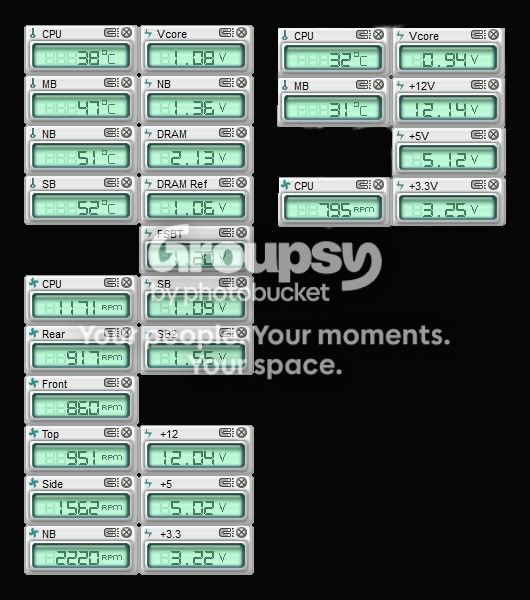
If you look at the Gigabyte Boards Compared or the ASUS Boards Compared, you'll see relatively minor differences in the basic specifications. The biggest differences will be in the overclocking options in the BIOS and the number of sensors that report voltages and temperatures.
.
Note the difference in what is reported by PC Probe II, (ASUS monitoring software), for my premium Rampage Formula on the left side of the picture and what's reported on my economy P6X58D-E on the right side.
.
.
Probe-A.jpg

.
.
The basic performance of the cheaper board will be just as good, and the cheaper boards will overclock fine up to a point - Maybe not as high as the more expensive boards, but high enough for 95% of us. Unless you're a hard-core overclocker or the board has some extra feature that you need, there's little reason to buy the more expensive boards.
.
That said, this is YOUR build- You might want a premium board - I did on my first build, but now I'm buying cheaper MBs and spending the difference on other things like cases, GPUs, etc. :)
 
Enough said! Thanks for the outstanding input. I have printed my manual for the MB you recommended and am reviewing it as we speak. I will pull the trigger tomorrow and spend some quality time over the holiday preparing myself for the time that is to be well spent!

Kudos! Lewiedude.
 
I am going to do the order tonight but have one last question.

I have been reading the comments about the OCZ ssd drives at Newegg and have noticed comments about 2.5" vs. 3.5" sizes. I am not going to ever put it into a laptop. What is the reason to use one over the other for a desktop? I am looking to go with 120gb capacity over the 90gb capacity. Any thoughts are greatly appreciated!
 
Last edited:
The SSD's are tiny, I guess because the components that comprise them are very small. Mine's a 2.5" - not much larger than a credit card. In the picture of my system in my sig, you can just see the edge of my SSD mounted in a 2.5 to 3.5 adapter underneath the big Spinpoint hard drive. I'd bet if you opened up one of the 3.5" SSDs it'd be mostly empty space inside. Doesn't really matter what size you get, but if you get a 2.5" don't get a bare drive - It won't come with the 2.5 to 3.5 adapter.
 
I ordered the components and am now awaiting delivery! Thanks for the help and I am now reading up on the motherboard. Not to sound too new to the game, but how important is the antistatic requirements? I mean I know how important it is, but what are the tips from an expert you can give on how to accomplish 'antistatic-ness' without the antistatic bracelet or table covering?
 
Back
Top