
Simple advice on HPE480t series

I've never used a wrist band and never had a problem in the five builds I've assembled. I would recommend staying off of carpet when working on a computer. I've assembled all of mine on the kitchen table which is on a wood floor. When assembling I make it a habit to touch the case first before touching a component. Honestly, as long as you're not standing on carpet, I think there's zero chance of zapping a component, but they say it happens.
 
Well, I ordered the following item from Newegg for $270(yet to arrive as part of a completely new build):

G.SKILL Ripjaws Series 12GB (3 x 4GB) 240-Pin DDR3 SDRAM DDR3 1600 (PC3 12800) Desktop Memory Model F3-12800CL9T-12GBRL

http://www.newegg.com/Product/Product.aspx?Item=N82E16820231358

And now they have this deal for $125:

G.SKILL Ripjaws Series 8GB (2 x 4GB) 240-Pin DDR3 SDRAM DDR3 1600 (PC3 12800) Desktop Memory Model F3-12800CL9D-8GBRL

http://www.newegg.com/Product/Product.aspx?Item=N82E16820231314

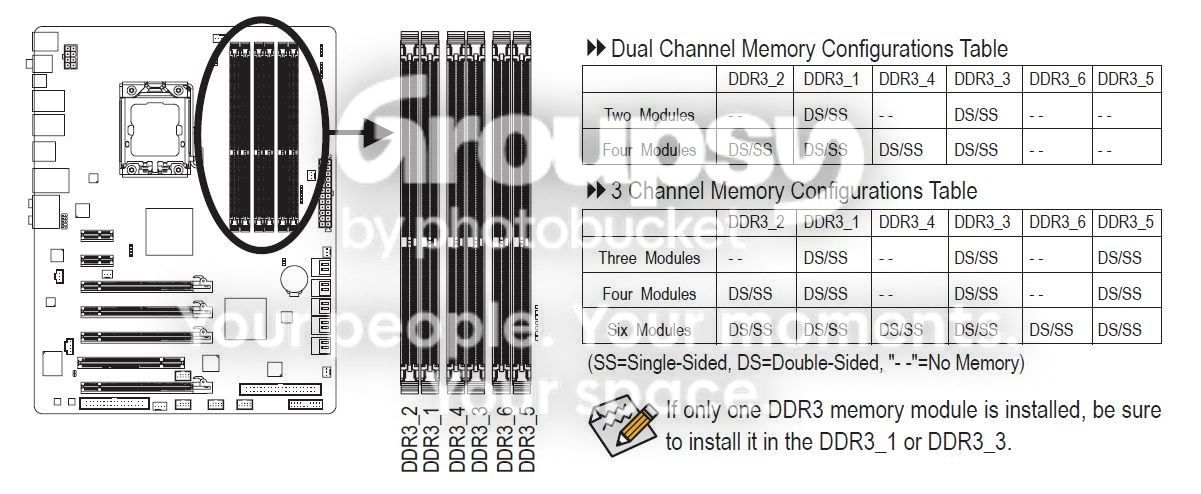
Can't I order the sale memory and get a two pack for 16GBs of RAM for a better price as 12GBs of RAM already ordered? My MB is: GIGABYTE GA-X58A-UD3R LGA 1366 Intel X58 SATA 6Gb/s USB 3.0 ATX Intel Motherboard

Thanks and I would really like to place the replacement order with more RAM at a better price real soon!!
 
Yes, you can put 4 modules in dual channel,


The three things that I would be (slightly) concerned about is (1) I think you'll give up some memory bandwidth (speed) running dual channel vs triple channel, (2) You'll be forced to use memory slot DDR3_2 which may or may not interfere with the CPU cooler, (3) 4 modules in dual channel will be positioned in much closer proximity with each other than three modules in triple channel (ability to disperse heat).
 
Wow, so much to learn! At least you are a real pro and are very, very helpful.

I stayed with the original order and can't wait to assemble it. I read the manual for the MB as suggested, and am ready to go. Realistically, how many hours do you think it will take to build, set up and begin the process of making all of the necessary updates? Should I plan to do it in one fell swoop? Say, if it take 3 to 4 hours to get it built, running and stable should I dedicate all of the time in a block? Or, can I break it up into to 2 hour blocks(i.e. building to system wise). Any advice is really appreciated, as always.
 
I'd say it will take 4-6 hours to assemble depending on your attention to detail. I'd say to take your time - Double check everything as you go. Most important part is getting all the standoffs in the right places and getting the MB/heat-sink assembly mounted correctly in the case. Install the RAM after the MB is mounted. Essentials are a couple sizes of zip ties, (small and a little bigger), small diagonal cutters, (to clip the ends off the ties), small flashlight, (I wear one of these - Yea, quite a sight, but hands free light is very nice), and of course small screwdrivers, etc. Don't worry too much about cable routing or zip ties to start. Just get it together right and start it up. If everything's OK, (hopefully), you can go back later and work on getting the cables neat and tidy. Plan on another couple of hours to install basic OS, drivers, essentials. Then you can start the endless task of tweaking, (If you're like me). Good Luck with your first build, and pictures are mandatory.
 
Back
Top