
Witterings
New Member
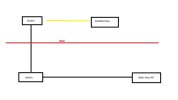
I've attached a pic as well .... My Non mesh router is in one room and has an ethernet connection to a switch in another room and then ethernet to my main Deco BE65 set up as an access point in the area the strongest WiFi signal is required.
I want to add a satellite in the room where my router is as it's struggling to get a decent WiFi signal in there, it doesn't need to be that fast an I sit right next to it so looking at getting maybe a Deco X20 to put in there.
Can I take an ethernet into the same router as the BE65 (have used a yellow line on drawing to show where it'd be in the chain) and set it up as an access point and will that work as part of the same mesh network or do I have to wireless backhaul the X20 to the BE65 and us it as a range extender?
I appreciated it'd probably be best to take another ethernet out from the BE65 straight to the X20 but unfortunately that's not possible.
Any help, much appreciated.
I want to add a satellite in the room where my router is as it's struggling to get a decent WiFi signal in there, it doesn't need to be that fast an I sit right next to it so looking at getting maybe a Deco X20 to put in there.
Can I take an ethernet into the same router as the BE65 (have used a yellow line on drawing to show where it'd be in the chain) and set it up as an access point and will that work as part of the same mesh network or do I have to wireless backhaul the X20 to the BE65 and us it as a range extender?
I appreciated it'd probably be best to take another ethernet out from the BE65 straight to the X20 but unfortunately that's not possible.
Any help, much appreciated.
Attachments
Last edited:

