
TP Link Deco Satellite Setup

Witterings

New Member
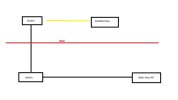
I've attached a pic as well .... My Non mesh router is in one room and has an ethernet connection to a switch in another room and then ethernet to my main Deco BE65 set up as an access point in the area the strongest WiFi signal is required.

I want to add a satellite in the room where my router is as it's struggling to get a decent WiFi signal in there, it doesn't need to be that fast an I sit right next to it so looking at getting maybe a Deco X20 to put in there.

Can I take an ethernet into the same router as the BE65 (have used a yellow line on drawing to show where it'd be in the chain) and set it up as an access point and will that work as part of the same mesh network or do I have to wireless backhaul the X20 to the BE65 and us it as a range extender?

I appreciated it'd probably be best to take another ethernet out from the BE65 straight to the X20 but unfortunately that's not possible.

Any help, much appreciated.
 

Attachments
  • Deco.jpg
    Deco.jpg
    16.4 KB · Views: 8
Last edited:
Your non mesh router not have wifi functions?

What's the router model # and switch model #? Your sketch should work under normal circumstances.
 
Your non mesh router not have wifi functions?

What's the router model # and switch model #? Your sketch should work under normal circumstances.

The router does have a mesh function but it's a Nokia router and is only compatible with their nodes / satellites, I do have 2 of these but please trust me when I say they have issues and aren't compatible with other things so have long since given up trying to get them to work and they're "locked" by the provider to a degree.

I have tried leaving the routers WiFi / SSID enabled and switching as I move from one area to the other but I think it's causing some clashes on the network but it'd be better to have everything on the one mesh network than different ones.
 
Your wired backhaul plan will work grand. What you're describing with the yellow line is exactly the right approach - connect the X20 via ethernet to the same switch as the BE65 and the Deco app will detect it as a wired backhaul connection when you add it to the mesh. Both nodes being on the same switch is perfectly fine, they'll communicate through your LAN.

To set it up: open the Deco app, tap Add > Deco Device, power up the X20, and it'll be discovered automatically. The app handles the rest and sets up the wired backhaul without any manual config.

One thing worth doing once it's all working - disable the Nokia router's WiFi entirely or at least change the SSID so devices don't try to connect to it separately and cause the roaming issues you mentioned. Having two different WiFi networks on the same LAN is what causes the switching clashes.
 
The wired backhaul plan via the switch will definitely work. The Deco app handles detection automatically once the X20 is connected by ethernet to the same switch as the BE65.

A couple of extra things worth knowing for this setup:

The Deco uses 5 GHz as the backhaul band by default when it detects a wired connection, but it still uses the wireless bands for client connections on all nodes. So the X20 in the router room will serve local clients on both 2.4 GHz and 5 GHz once it is in the mesh.

For the Nokia router conflict, if you cannot disable its WiFi entirely, at minimum change its SSID to something completely different from the Deco network name and manually set it to a specific 2.4 GHz channel (either 1 or 11) so it does not overlap with whatever channel the Deco nodes are on. The Deco app shows you each node's channel under its details tab. Client devices will naturally gravitate toward the Deco nodes with the stronger signal once the SSIDs are different.

One last thing: after adding the X20, run a quick speed test from a device right next to the new node to confirm backhaul is actually wired and not falling back to wireless. The Deco app shows the backhaul connection type under each node.
 
Back
Top