
Using "WMWare Workstation" and Win ME Problem

Cut it with the caps and bold text mate. I don't see what's so difficult, all you have to do is mount the ISO and see if the game works. You don't mount the ISO by dragging it into the 'virtual drive', you need to mount it by (inside of VMware) doing this:

1 - Go to VM -> Removable Devices -> CD/DVD (IDE) -> Settings
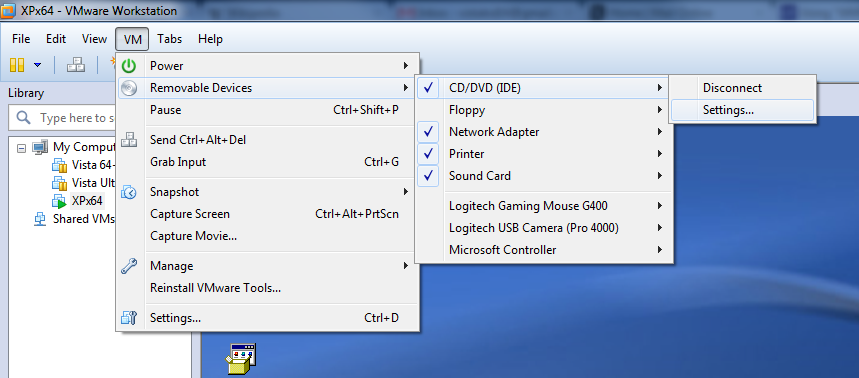
iso1.png


2 - Click 'Use ISO Image File' and find your ISO, in this example I'm gonna use an IOS of XP. Once selected, click 'OK' and then 'OK' again
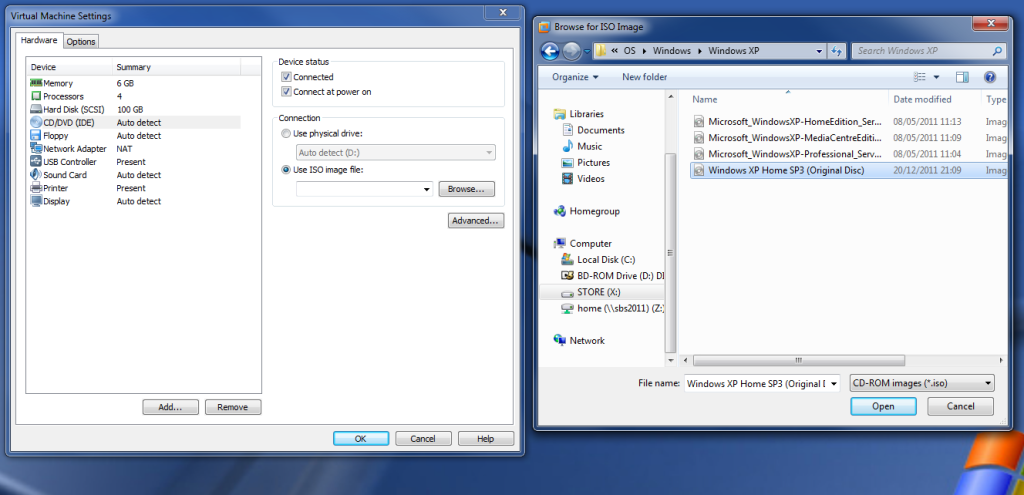
iso2.png


3 - And the VM of XP will see the ISO as a CD
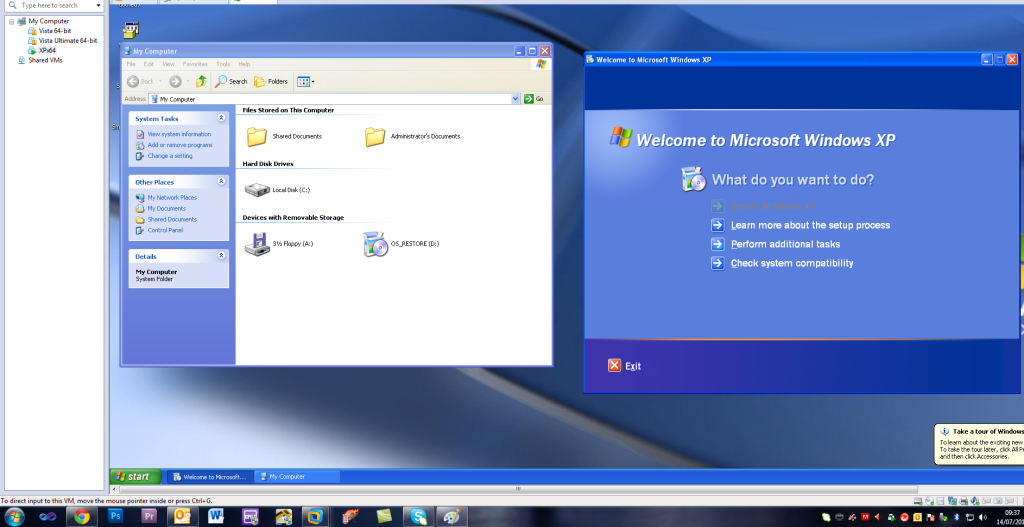
iso3.png


That's how you do it in VMware Workstation 8. What version do you have?

Leave the ISO mounted (do not unmount it) and see if the game works.
 
Cut it with the caps and bold text mate.
....no thank you "mate" as this is the way i type - to accentuate and to segregate my responses from the answers.

I don't see what's so difficult,
........neither do i since the directions appear clear

all you have to do is mount the ISO and see if the game works. You don't mount the ISO by dragging it into the 'virtual drive', you need to mount it by (inside of VMware) doing this:

.......I am using version 7.0.1 build-227600 .i tried this a few times and i was unable (following all the directions explicitly) to accomplish this......i attempted to use a separate cd-rom virtual drive program and place that into the virtual win me drive, then, copied the game program iso into the virtual win me drive. i could not install the game disc unless i used the host cd rom "mechanical" drive which would be defeatist to what i am trying to accomplish - which is to have teh game disc run in win me and to NOT use a cd-rom drive at all. i will however attempt this again this morning sometime. Thanks for the response.
 
How did you create the ISO of the game exactly? Something's telling me the ISO is bad.

How do you mean you couldn't install it? Couldn't figure out how to install it or the installer wouldn't let you install it?
 
....thanks for teh reply

(I only have a min here then, have to step out for a bit)

How did you create the ISO of the game exactly? Something's telling me the ISO is bad.
...i used magic iso and made a typical ISO image and, went as far as making a udif(?) (probably have the letters wrong here with only 1 cup of coffee in me!) image and tried them both.

How do you mean you couldn't install it?
....just exactly that. when the vmware program asked me for the location of the cd image/iso, i directed it to a folder created in the host computer containing the iso and followed directions....skipping ahead: i saw the virtual drive created when i attempted to use a program called virtual drive creator (using that in the virtual drive environment) and further, when i right clicked on the virtual cd drive and hit "properties", it had the size commensurate with the game disc......so, then i click on the virtual drive (as above) and i see the graphics of te game (so-to-speak) but, it appears non functional....i am going to see if i can "aquire" another game, make iso, and retry to eliminate a possible bad iso as mentioned.....

Couldn't figure out how to install it or the installer wouldn't let you install it?
__________________
 
Back
Top