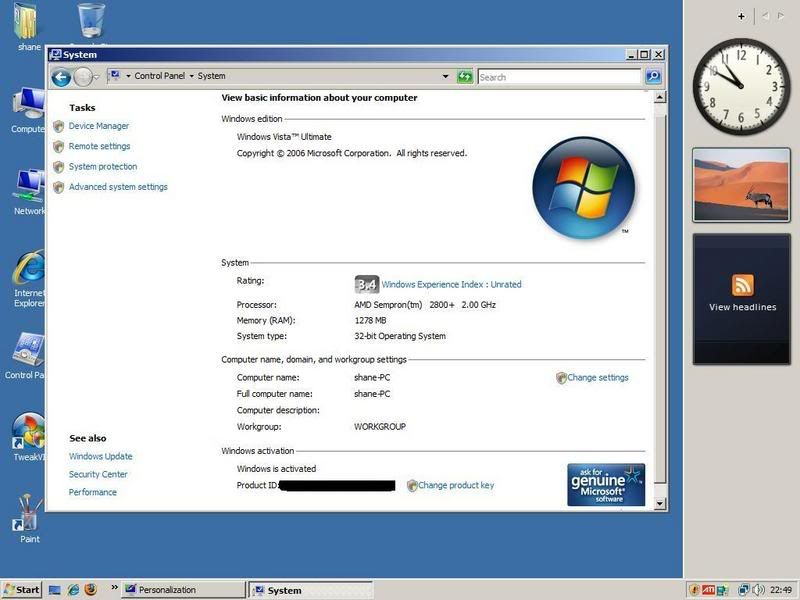
Vista Ultimate (Driver problem?)

Gee? When I capture screens on Vista they look like... http://img338.imageshack.us/my.php?image=dukestartoffsu1.jpg Your problem is something that Kornowski should already be familiar with.

The latest Catalyst versions "will not work" on a Radeon AGP card with a 9xxx ATI chip on it. The last Catalyst version to run on a card with the 9600 is the Catalyst 5.11 version for the older card. The last card here was the 9550 that also has the 9600 on it. The latest 7.2 requires at least the X700 model while even that is on the way to the "discontinued lineup". http://www.tweaktown.com/articles/838/

Okay,I uninstaled the latest version of Catalyst and instaled Catalyst 5.11....but i get an error during instilation...

Setup is unable to compleate the instilation
Try to set up your display adapter with a standard VGA driver before running setup.

wth? :D

And about pasting the image into wordpad Kornowski,Still the same:mad:
 
You may want to review the thread seen at http://www.computerforum.com/76769-problem-general-pc-performance.html#post597136 about this. I happen to be in full agreement with what is seen there since I have been running different cards with ATI vpus on them and have been snagged when the latest Catalyst update lacks support for the older models.

That doesnt prove anything! Like I said they work fine on mine and thats not the only ones I have done using the new drivers. They just dont support anything from the 9500 back.
 
Last edited:
That doesnt prove anything! Like I said they work fine on mine and thats not the only ones I have done using the new drivers. They just dont support anything from the 9500 back.

More like they don't really support anything from the 9800 all in wonder all the way back with the X700 line next to go the way of the dinosaur as a discontinued item. What you are missing is what happens when trying to run games like Steam: Source and see crashes left and right with too new of a catalyst. Remove the catalyst or go with the basic drivers only and the games run fine. The last effective catalyst for the 9600 chip was the Cat. 5.11 otherwise stay with the basic drivers or... :mad: now what! grrr...
 
What you are missing is what happens when trying to run games like Steam: Source and see crashes left and right with too new of a catalyst. Remove the catalyst or go with the basic drivers only and the games run fine. The last effective catalyst for the 9600 chip was the Cat. 5.11 otherwise stay with the basic drivers or... :mad: now what! grrr...

What you seem to be missing is that just because it happens to you does not mean its the (rule)! And everytime you bring that up it seems not to work for them. It seems like its only a problem you have, show me a post or a link to back that up on a 9600 with the 7.2!
 
I'm far from the only one that has seen problems with the catalyst when going for an update. The ATI catalyst has a reputation already for causing problems for gamers. The usual recommendation is to disable it, exit it, or remove it entirely. This has been going on for some time. Where have you been?
http://www.theinquirer.net/default.aspx?article=18119

http://www.techspot.com/vb/all/wind...adeon-Drivers-and-Catalyst-Control-Panel.html

"Try to set a system restore point before installing a device driver. This will help if you installed a wrong driver. Problems can arise when your hardware device is too old or not supported any longer." http://drivers.softpedia.com/get/GRAPHICS-BOARD/ATI/ATI-Catalyst-72-Display-Driver.shtml

oriz_dots.gif
 
I'm far from the only one that has seen problems with the catalyst when going for an update. The ATI catalyst has a reputation already for causing problems for gamers. The usual recommendation is to disable it, exit it, or remove it entirely. This has been going on for some time. Where have you been?
http://www.theinquirer.net/default.aspx?article=18119

http://www.techspot.com/vb/all/wind...adeon-Drivers-and-Catalyst-Control-Panel.html

oriz_dots.gif

The first link has nothing to do with the 9600 and the second one is from (2003), Im still asking where all these people are or all these links you talk about! Wheres these post that you helped people and it (WORKED)!!
 
I don't really know what could be the problem, have you tried using any screenshot software?
Does it work when you try and take the screenshot when in XP? That'll see if it is Vista or the compuer :)
 
I don't really know what could be the problem, have you tried using any screenshot software?
Does it work when you try and take the screenshot when in XP? That'll see if it is Vista or the compuer :)

yeah i said ive used screenshot software,Ive pasted it into word,Dont the basic paste in wordpad and still its the same.

Nope its definatly not the computer....screenshots take perfect in Windows xp and they did on Kubuntu linux too.

i think its those graphics drivers...there just so dodgy at the moment... catalyst 5.11 wont even install:D
 
Did you use the catalyst uniuntall tool for removing all of the ATI drivers first before trying to run the installer for the 5.11 version? When reverting to an older version of drivers/software on any card you need to see that anything newer has been completely removed. For a screen shot capture program that works just as well in Vista as in XP the FastStone capture program is one freeware that works out great for this. http://www.faststone.org/FSCaptureDetail.htm
 
omg its still the same :mad:

the ones from AMD s site for Vista X32 are not working.

Anyone know what the hell is causing this?...I have vista and cant take any screenshots and some of the images are messed up:mad:

There isnt any ATI Omega drivers for Vista that i know of....whats the name of those other alternative drivers?
 
I might be wrong:)

But isn't there in the "Security Options" a switch for "Secure Desktop". Maybe this frazzles the screen for security reasons.

Even if I'm wrong, it's a damn good suggestion:D

actualy yes you could be right...when i instal programs in vista the screen goes all wierd and asks me if i want to allow the software to instal...then when i click yes the screen goes back to normal.

However why would this affect just a simple printscreen and paste in Paint?

Could you give me directions how to disable the secure desktop please?
Ive only used vista a couple of times since instaling it and havnt quite found my way around Vista yet:D
 
i just looked it up, it's an nvidia problem only.

you have to disable aero until a new driver comes out, is the only solution they had.

secure desktop just means every window that isn't active is darkened, i just looked that up too
 
i just looked it up, it's an nvidia problem only.

you have to disable aero until a new driver comes out, is the only solution they had.

secure desktop just means every window that isn't active is darkened, i just looked that up too

hmm okay...even though my card isnt nVidia i will try disabling Aero and see if screenshots take normaly.

I hope they sort this out though.
 
Hey now this is wierd...i just changed my theme from Vista aero to Classic and the picture took fine:D

However....i hate the classic:mad:

It must have something to do with Aero

vista.jpg
 
Back
Top