What does this do?

bkribbs

New Member
Hey, sorry we took a bit getting to you. I looked it over but dont see anything malicious. Has she been having problems? Though there are several items which could be eliminated for speed.

Uninstall the yahoo toolbar

In hijackthis place a check mark by each of these, then click the "Fix Checked" button.

O4 - HKLM\..\Run: [QuickTime Task] "C:\Program Files\QuickTime\qttask.exe" -atboottime

O4 - HKLM\..\Run: [SunJavaUpdateSched] "C:\Program Files\Common Files\Java\Java Update\jusched.exe"

O4 - HKCU\..\Run: [MSMSGS] "C:\Program Files\Messenger\msmsgs.exe" /background

O4 - HKCU\..\Run: [SUPERAntiSpyware] C:\Program Files\SUPERAntiSpyware\SUPERAntiSpyware.exe

Then restart and re-run hijackthis and post the new log.

You should create a recovery CD when HP prompts you to at startup. And you should actually use DVD's, not CD's to do it.

And if you want, post a program uninstall list from HiJackThis In "Misc Tools" --> "Uninstall Manager" --> "Save List" button then save and copy, then paste it here.

I swiped this from another thread on here. What does placing the checks there do? Does that remove them from startup? I know those aren't viruses so I was just wondering.
 
Yes, its stops those programs from running on bootup, which makes bootup quicker. Many users just keep installing and installing programs and don't realize that most programs adds their entry to bootup, which you don't need except for active antivirus/malware/security programs.
 
Yes, its stops those programs from running on bootup, which makes bootup quicker. Many users just keep installing and installing programs and don't realize that most programs adds their entry to bootup, which you don't need except for active antivirus/malware/security programs.

OK thanks. I swiped this from another thread. What exactly does it do? I see that in this folder there is a virus, but does it simply delete the folder or what? And why do you not have the other folders where it says there is a trojan?


1. Go to Start > Run > type Notepad.exe and click OK to open Notepad.
It must be Notepad, not Wordpad.
2. Copy the text in the below code box

Code:
Folder::
c:\documents and settings\Bryan\Local Settings\Application Data\ssjaecesp


3. Go to the Notepad window and click Edit > Paste
4. Then click File > Save
5. Name the file CFScript.txt - Save the file to your Desktop
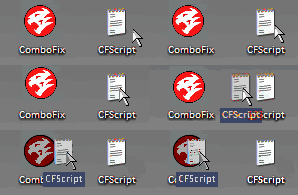
6. Then drag the CFScript (hold the left mouse button while dragging the file) and drop it (release the left mouse button) into ComboFix.exe as you see in the screenshot below. Important: Perform this instruction carefully!


CFScript-1.gif


ComboFix will begin to execute, just follow the prompts.
After reboot (in case it asks to reboot), it will produce a log for you.
Post that log (Combofix.txt) in your next reply.

EDIT- Also what is this?


yes, let malwarebytes remove whatever it finds. Did you click on remove selected button?

Also rerun hijackthis and place a check next to this entry.

O1 - Hosts: 63.146.124.21 cod4master.activision.com
 
Last edited:
That script deletes the folder and everything in it.

If you look in the malwarebytes log, all the trojans are in the temporary files, which was deleted. Ccleaner would have gotten rid of them too.


The remaining ones like this one.

C:\Documents and Settings\All Users\Application Data\Update\seupd.exe (Trojan.Clicker) -> Quarantined and deleted successfully

The folder update could be used for a different program.
 
Did you use any thermal paste? it's necessary, not an option. I would also reseat the heatsink and fasten it in an X fashion. that means, if you screw the top left screw in first, do the bottom right one after.

Check the backplate, sometimes they move loose and you can't screw the HSF in properly.

What difference does that make? I do it, but why?
 
Well it's like changing a wheel on your car. equal pressure, you don't want a wobbly wheel. and you don't want an uneven heatsink. :)
 
Well it's like changing a wheel on your car. equal pressure, you don't want a wobbly wheel. and you don't want an uneven heatsink. :)

Hm. Ok that makes sense. Thanks. All the heatsinks I use are numbered 1,2,3,4 so I have always done that but wondered why.
 
Back
Top